Call Blocking
Call Block
Applications > Call Block
The Call Block application can be used to block inbound or outbound calls, based on the Caller ID Name and/or Number (for inbound calls), or the Destination Number (for outbound calls).
Creating a New Call Block
To create a new Call Block, click the Add button at the top-right of the Call Block list page. A simple form will be presented…
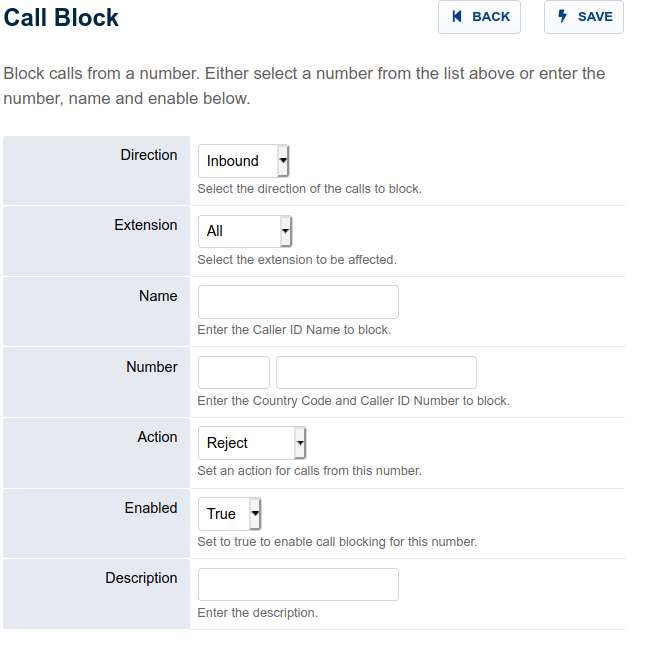
Field Descriptions
Direction – Select the direction of the calls you wish to block (Inbound or Outbound)
Extension – Select which extension (if any) the Call Block should affect.
Name – Enter the Caller ID Name that should be blocked. (Note: An exact, case-sensitive match is necessary, but this field can be considered optional if a Number is specified.)
Number – Enter the Country Code (eg. US = ‘1’) and the number to block. For Inbound calls, enter the calling party’s number. For Outbound calls, enter the Destination Number. (Note: An exact match is necessary, but this field can be considered optional if a Number is specified.)
Action – The action to take if the Name and/or Number is matched: Reject the call, play a busy signal, transfer to a specific extension, or voicemail box, etc.
Enabled – True or False
Description – The reason for blocking the number (? – you decide ;).
Note: Call Blocks can also be added in bulk using the Recent Calls list below the form.
Outbound Call Blocking
Outbound call blocking requires an additional dialplan entry.
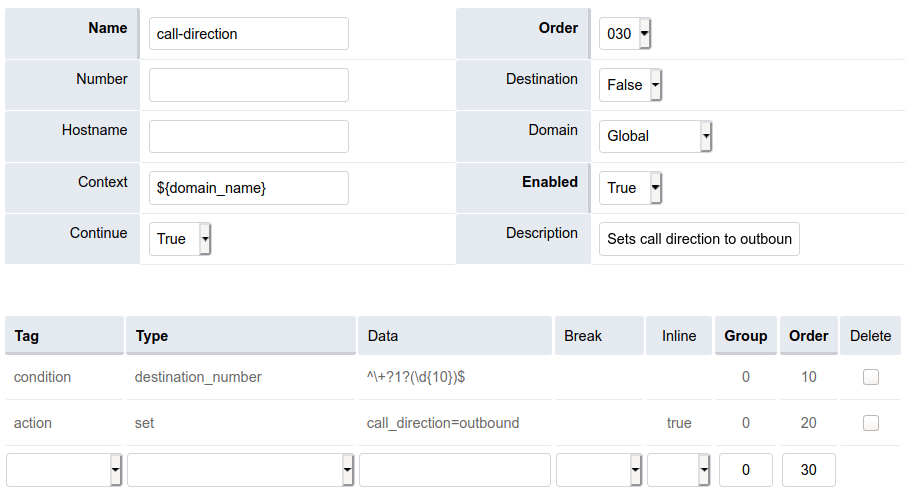
If one doesn’t exist already, add a new call-direction Outbound Route to set call_direction=outbound…
Be sure to set Continue to True, or dialplan execution will never reach your existing Outbound Routes! .
Note: The screen capture example above could be for 10-digit numbers, such as those in the U.S, so you may want to adjust the regular expression used to match the destination number format being used in your current Outbound Routes.
Troubleshooting
.
If Call Block is not working, ensure the following for the domain in question…
- The call_block dialplan condition value is set to detect both inbound or outbound calls, as in
^(inbound|outbound)$. - The call_block dialplan’s Order value is less than (read: before) your current Outbound Route Order values.
- The call-direction dialplan entry (mentioned above) has an Order value less than (read: before) the Order value of your call_block dialplan.
- Try flushing the cache (Status > SIP Status > Flush Cache button).
- Both the call_block dialplan entry and the call-direction Outbound Route dialplan entry are Enabled.
Published: nate, 11-18-2020 @ 5:09 PM Updated: nate, 11-18-2020 @ 5:36 PM
© Copyright 2008 – 2021 fusionpbx.com All rights reserved.